Short answer: yes, and it takes about five minutes. Grok cannot connect to a UK bank directly — it holds no banking licence and no open banking connection of its own. What it can do is read your bank data through Aureli, which holds the FCA-regulated open banking connection and exposes it to Grok as a custom connector at https://aureli.app/api/mcp. Add that URL once, authorise it, and Grok can answer questions about your balances, accounts, net worth and — where you switch transaction data on for a UK bank — the individual transactions behind them. It is free on every Aureli plan, read-only against your bank, and Grok can never move money.
Grok added custom connectors to the composer, which means the setup is now four clicks and a URL. No config file, no developer mode, no command line. The rest of this guide walks through it with screenshots.
What this actually does
Aureli connects to your UK bank accounts through Open Banking. We've also built an MCP (Model Context Protocol) server, which is the standard way assistants like Grok talk to outside tools.
Put those two together and Grok can read your financial data directly from Aureli: balances across your current accounts, savings, ISAs, pensions, investments, mortgages and credit cards. It can summarise your net worth, walk through your asset allocation, and answer questions like a finance-literate friend who happens to know your numbers.
Switch on transaction data when you connect a UK bank and Grok reads the movements behind those balances too: the date, amount, description, merchant and category of each one, and whether a payment is still pending. That is what turns "how much is in my current account?" into "what did I spend on groceries last month?". It is optional and off by default — the step below covers how to switch it on.
Grok can also update valuations on anything you track manually in Aureli — say, your property's market value or a private investment. You ask, it writes back to your portfolio. Bank-linked accounts keep syncing through Open Banking on their own, though with edit access Grok can ask them for a refresh on the spot.
What Grok cannot do: move money, open or close accounts, or take any action with your bank. Its access stops at Aureli.
The Aureli MCP server is free on every Aureli plan, including the free tier.
What you'll need
- A free Aureli account
- At least one UK bank account connected to Aureli via Open Banking
- Grok, on the web or in the app
- About 5 minutes
Step-by-step setup
1. Connect your bank to Aureli
Sign up at aureli.app and connect your bank accounts. Open Banking handles the connection in the UK and we use Stripe for US accounts. You authenticate with your bank using their own app or web flow, and Aureli receives read-only access to your account balances. Lloyds, Barclays, HSBC, Monzo, Starling, NatWest, Revolut and most major UK banks are supported.
If you want Grok to see your transactions as well as your balances, switch on Include transaction data (optional) on the review screen before you're handed over to your bank. Open Banking consents are fixed at the moment you authorise them, so that screen is the only place it can be chosen — a connection made without it has to be removed and set up again to add it. It's offered on UK connections only, not on US accounts through Stripe. Tracking bank transactions has the detail.
2. Open the connector menu in Grok
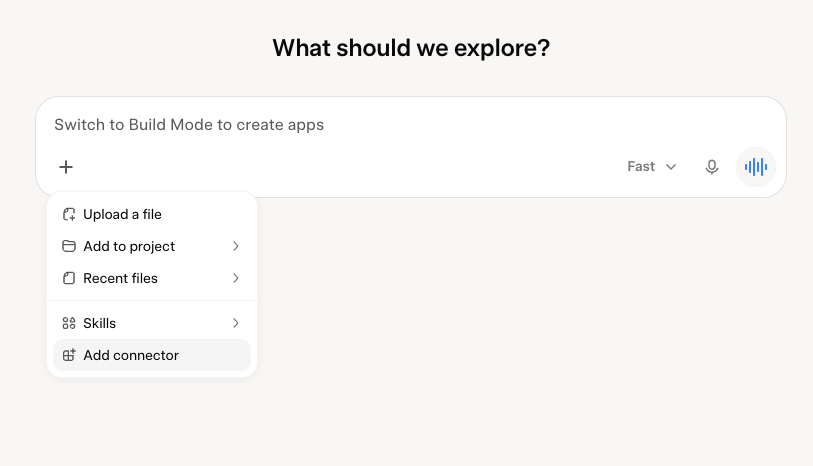
In Grok's composer, click the + button at the bottom left, then choose Add connector at the bottom of the menu.
3. Choose Custom
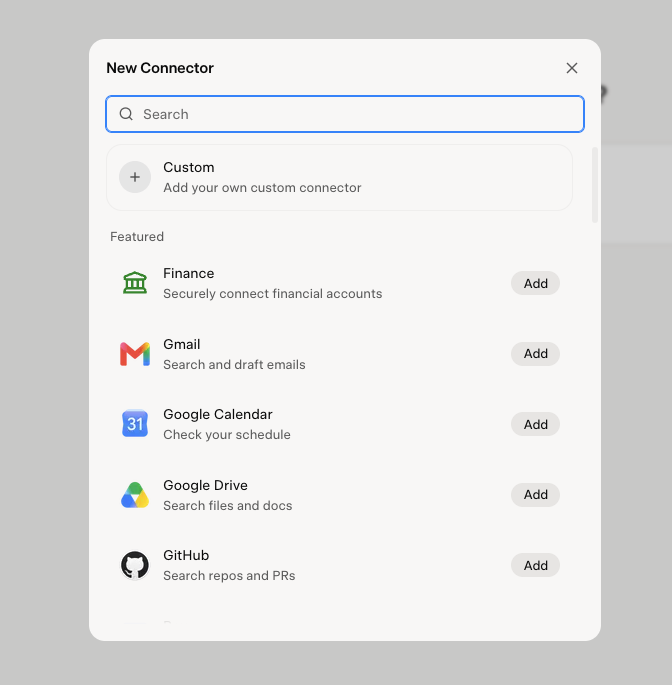
Grok opens the New Connector dialog with a list of featured connectors — Finance, Gmail, Google Calendar and the rest. Aureli isn't in that list, so pick Custom at the top, marked "Add your own custom connector".
4. Paste the Aureli server URL
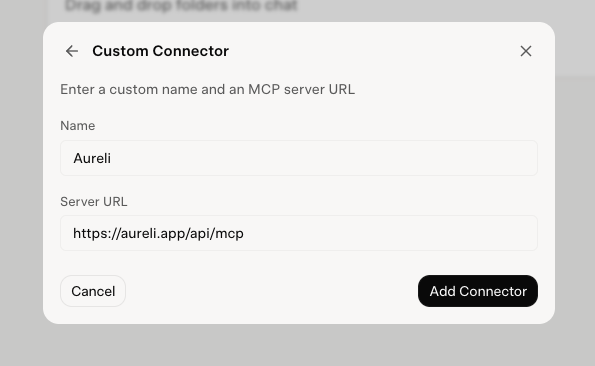
Give the connector a name and paste the Aureli MCP server URL:
https://aureli.app/api/mcp
Name it Aureli so it's obvious what it is when Grok cites it in an answer. Then click Add Connector.
5. Authorise the connection
Grok opens Aureli in a browser tab and asks you to sign in and approve the connection. Choose the scope you want:
- Read — Grok can read your portfolios, balances, net worth, allocation and valuations. This covers every question in the next section except updating a valuation.
- Read and edit — adds three writes, all inside Aureli: new valuations on assets and debts you maintain by hand, filing transactions under spending categories, and asking your connected banks for fresh data on demand. It cannot create or rename accounts, move money, or change a bank connection.
Confirm, and you're returned to Grok with the connector live. That's the setup done.
The same URL works in Claude, ChatGPT and Gemini if you use those too — it's a standard MCP server, not a Grok-specific integration. We've written the same guide for Claude and covered the ChatGPT situation for UK users separately.
What you can ask Grok
A few prompts to try once you're set up:
- "What's my current net worth?"
- "How much do I have across all my ISAs?"
- "What's my mortgage balance compared to my property's equity?"
- "Break down my asset allocation by type."
- "How has my net worth changed over the last 3 months?"
- "What are my five largest assets right now?"
- "Update my flat's valuation to £450,000." — this one needs Read and edit; the valuation tools aren't offered to a read-only connection.
With transaction data switched on, the spending questions open up as well:
- "What did I spend on groceries last month?"
- "Find every subscription charge since January and total them up."
- "My current account is down £400 this month. What moved?"
- "Compare what I spent on eating out in Q1 and Q2."
You can go further than this. Grok can reason about the data: "If I overpaid £500 a month on my mortgage, how long would it take to clear?" or "Roughly what percentage of my portfolio is in cash versus equities?"
The quality of the answers depends on the quality of the data. The more of your accounts you connect to Aureli, the more complete a picture Grok has.
Security and privacy
A few things worth being clear about. If you want the wider picture first, we've written a separate guide on whether it's safe to connect AI to your bank account.
Open Banking is FCA-regulated. Aureli Tech Limited (FRN 1056139) is a registered agent of Finexer Ltd (FRN 925695), which is authorised and regulated by the Financial Conduct Authority as an Account Information Service Provider (AISP).
Aureli never sees your banking credentials. When you connect a UK bank, you authenticate directly with the bank. Finexer receives a token that grants read-only access to account information and balances, and shares that information with Aureli. Learn more
Grok's access is scoped to Aureli, not your bank. The connector exposes a fixed set of tools. Read access covers your portfolio data and, on the accounts you opted in, your transactions — both of those tools are read-only. Edit access adds the three writes listed above: valuations, transaction categories, and a refresh from your connected banks. A refresh only asks your banks for data you have already consented to share. Nothing in either scope can move money, open or close accounts, or alter a bank connection. You choose which scope to grant when you authorise.
Transaction data is opt-in, and deleting it is one click. Leave the toggle off and nothing changes: Aureli syncs balances as before and there are no transactions for Grok to read. Where you switch it on, Delete transaction data in the connection's menu permanently removes every transaction Aureli holds for it, leaving your accounts, balances and holdings untouched.
You can disconnect at any time. Revoke the connector from Profile → Security → Connected Apps in Aureli, or remove it in Grok. Either takes seconds. Managing connected apps covers it.
We don't sell your data. We don't share it with advertisers. The full details are in our privacy policy.
One thing to keep in mind: anything you discuss with Grok is processed by xAI according to their terms. If that matters to you, that is the part to weigh rather than the bank link itself.
Common questions about connecting Grok to your bank
Can Grok connect to my bank account?
Not directly. Grok holds no banking licence and no open banking connection of its own, so it reaches your accounts through a service that already has one. Aureli holds an FCA-regulated open banking connection to your UK banks and exposes your portfolio to Grok as a custom connector, so Grok reads the balances, valuations and — where you switch transaction data on — the transactions Aureli has already synced, rather than talking to your bank itself. That indirection is the point: it keeps the regulated connection with a regulated firm, and gives you one place to revoke access.
Does Grok support UK open banking?
Not on its own — Grok is not an open banking participant and holds no FCA authorisation. UK open banking access comes from the tool you connect it to. Aureli Tech Limited (FRN 1056139) is a registered agent of Finexer Ltd (FRN 925695), which is authorised and regulated by the FCA as an Account Information Service Provider, so connecting Aureli is what puts UK open banking data in front of Grok. The same applies to Claude, ChatGPT and Gemini, which reach the data through the same Aureli MCP server.
Can Grok see my bank transactions?
Yes, if you switch transaction data on. It is optional and off by default: an Include transaction data toggle appears on the review screen when you connect a UK bank, and because Open Banking consents are fixed once authorised it has to be chosen then rather than added later. With it on, Grok can list the accounts carrying transaction data and read their transactions for a date range you specify — date, amount, description, merchant, category, and whether a payment is still pending. A single read returns up to 200 transactions, so where a span holds more than that Grok narrows the range and reads again. Both tools are read-only and included on every Aureli plan. It is offered on UK connections only, not on US accounts through Stripe.
Is it safe to connect Grok to my bank?
Grok never touches your bank. You authenticate directly with your bank's own app or website, your credentials are never shared with Aureli or xAI, and the bank connection itself is read-only whatever you grant Grok. Grok's access stops at Aureli, and you choose its scope when you authorise: read-only, or read plus a set of writes that stay inside Aureli — valuations you maintain by hand, such as a property estimate, transaction categories, and a refresh from your connected banks. Under either scope it cannot move money, open or close accounts, or alter a bank connection. The one thing worth weighing is that whatever you discuss with Grok is processed by xAI under their terms, so if a figure is sensitive to you, that is the part to think about rather than the bank link.
Which UK banks work with Grok?
Any UK bank Aureli can connect to, which covers most of the market — Lloyds, Barclays, HSBC, NatWest, Santander, Nationwide, Monzo, Starling and Revolut among them, along with their business and commercial variants. Once an account is connected to Aureli it is visible to Grok automatically, with no per-bank setup on the Grok side. The complete list is in our knowledge base article on supported UK banks.
Get started
Sign up at aureli.app, connect a bank account, and paste https://aureli.app/api/mcp into Grok as a custom connector.
Five minutes from now, Grok will know what your money is doing.